Ferry
Every server, one window. An SFTP, FTP and S3 client for macOS and Windows with a terminal built in.
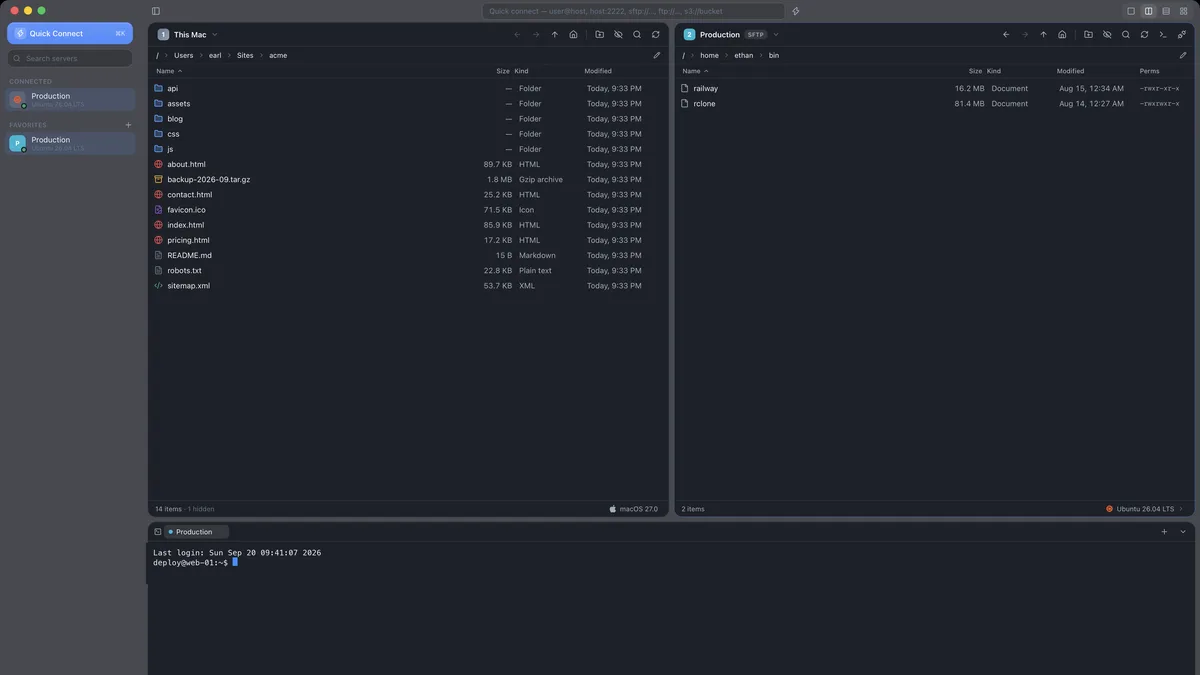
Ferry is a desktop file-transfer client built with Tauri: a Rust core that speaks SFTP (password, key file, OpenSSH certificate or ssh-agent), FTP and FTPS, and S3 — Amazon plus anything S3-compatible such as MinIO, Cloudflare R2, Backblaze B2 and Wasabi — under a React interface that feels native on a Mac and just as much at home on Windows. The window splits into one to four resizable panes, each showing any open connection or the local machine, and anything can be dragged between any two of them: local to server, server to local, server to server, or one selection fanned out to several servers at once.
Beyond moving files it is a place to work on a server. A terminal opens on the same SSH connection, no second login and no second host-key prompt, so an upload can be untarred where it landed. On connecting, Ferry asks the other end what it is and puts the answer — Ubuntu, Debian, macOS, Windows Server, FreeBSD, or the cloud provider behind an S3 endpoint — with the right logo in the status bar, so staging never gets mistaken for production. Permissions get a proper rwx editor, favourites live in nested groups with colours, and servers import from FileZilla, Cyberduck, WinSCP or ~/.ssh/config (Railway's services included).
Passwords never leave the machine: they sit in an AES-256-GCM vault whose key is the one item Ferry keeps in the Keychain or Credential Manager, so there are no keychain prompts. Builds are Developer ID signed and notarized, the icon is a native Liquid Glass icon on macOS 26 with legacy fallbacks, and updates are signed and installed in place from Harbor, the release server that also feeds Caspian.
Highlights
- SFTP, FTP, FTPS and S3-compatible storage from one window, up to four servers side by side
- Drag and drop between any two panes — including server to server — and Copy to… many at once
- Terminal on the existing SSH connection; server OS and provider detected with the right icon
- Encrypted vault with a single keychain key, signed in-app updates, notarized macOS builds